Spreadsheet Planning
Teams export data, calculate outside SAP and manually bring results back.
N2ONE Core connects SAP ECC data and processes into a reusable integration foundation. Use it to understand the ECC environment, automate workflows, add N2ONE IBP+ planning, and extend any of these capabilities with private AI.
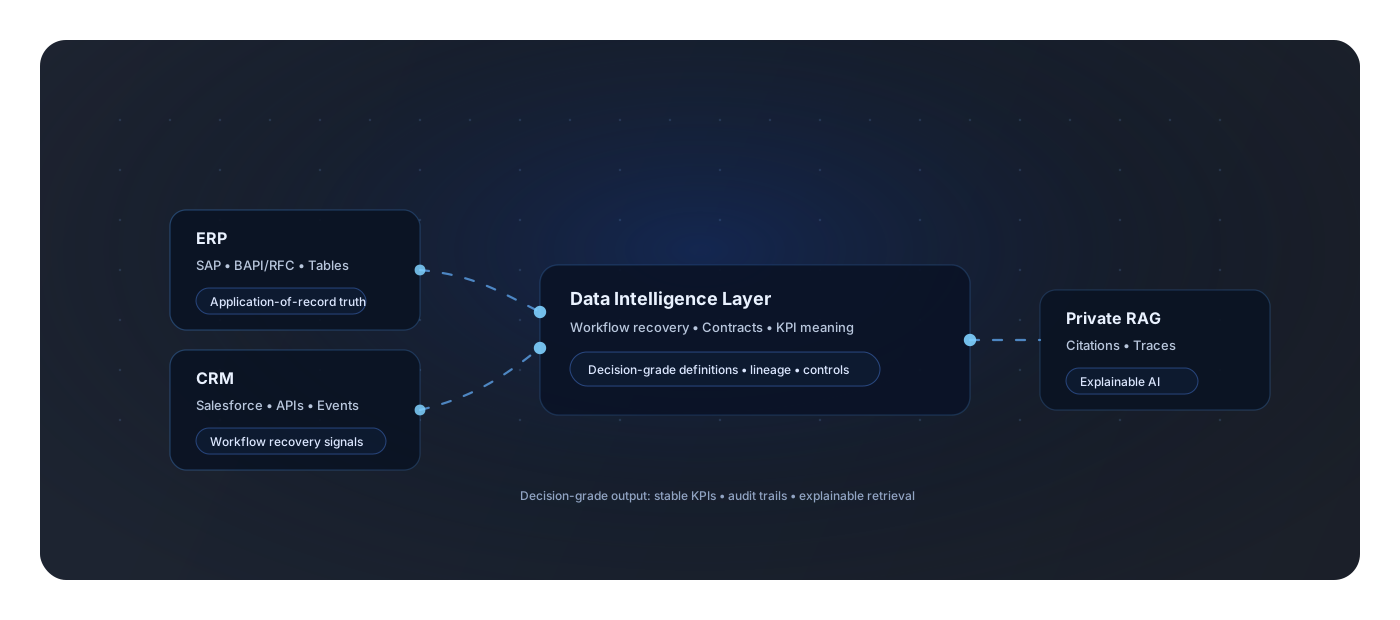
ECC Intelligence documents how the system is configured, customized and actually used, then creates a dynamic baseline for modernization, migration and continuous improvement.

Long-running ECC environments often work through a mix of SAP, custom logic and spreadsheets. Core helps remove the manual handoffs without forcing a major ERP redesign.
Teams export data, calculate outside SAP and manually bring results back.
Users repeat the same pricing, order, delivery or master-data transactions.
Important business logic lives in Z tables, custom fields and company-specific processes.
Master data needs cleanup, mapping and validation before migration can move confidently.
Choose one process with visible manual effort or disconnected data. Deliver value first, then expand.
Apply contract rules and push approved pricing transactions into SAP.
Combine logistics data with ECC inventory and delivery processes.
Inventory, pricing, sales-order creation and delivery-status integration.
Process country-specific eInvoice data and required government documentation.
Produce recurring operational, reconciliation and management workbooks automatically.
Clean, map, validate and reconcile ECC data before migration.
Start with Core. Add deeper ECC understanding and custom planning where they create value. Private AI can be applied across the same foundation.
Connect SAP ECC, custom data and external sources into reusable workflows for integration and automation.
Document configuration, customizations, relationships and usage so modernization starts from evidence instead of assumptions.
Explore SAP ECC Modernization ECC Intelligence product details →Use the same connected ECC foundation for inventory, demand, procurement and Sales & Operations Planning.
Explore N2ONE IBP+Extend Core, ECC Intelligence or IBP+ with customer-controlled AI Extend Core, ECC Intelligence or IBP+ with customer-controlled AI when the use case or data boundary calls for it.mdash; on Azure, AWS or your own servers Extend Core, ECC Intelligence or IBP+ with customer-controlled AI when the use case or data boundary calls for it.mdash; when the use case or data boundary calls for it.
Our senior SAP leads use N2ONE Core in two ERP Your Way stages — so decisions and data loads rest on your real system, not assumptions. 75+ SAP migrations delivered.
ERP Your Way · 01
Evaluate
The proposals are on your desk
ECC Intelligence maps configuration, Z-tables and usage, so proposals are checked against the system you actually run.
ERP Your Way · 03
Launch
The go-live date was just announced
Master data cleaned, mapped and validated, with repeatable test loads through cutover.
For a broader ECC initiative, begin with SAP ECC Modernization. If you want help deciding where Core fits, request an expert review.